
Safer and Smarter Travel in Google Maps
I led the design of Travel Mode, a concept feature,
that helps travelers feel safer exploring unfamiliar cities through:
🧠 Smart route suggestions 🚨 Crime rate awareness toggle
🥾 Walk route comparison 🆘 Emergency button access
After testing with travelers:
20 participant
93% (18 of 20)
Found Travel Mode toggle without guidance
95% (19 of 20)
Successfully completed the 'find safer route' task
75% (15 of 20)
Understood crime overlay unprompted
80% (16 of 20)
Said they'd feel safer using this while traveling
Signals that typically correlate with reduced support load and improved retention.
Project Overview
Type
Unsolicited concept project
Team
3 product designers collaborating remotely
My Role
Product designer - Research, interaction design, prototyping
Date & Timeline
(4-weeks sprint) 2025
Tools
Figma
Google Forms
Figjam
Maze
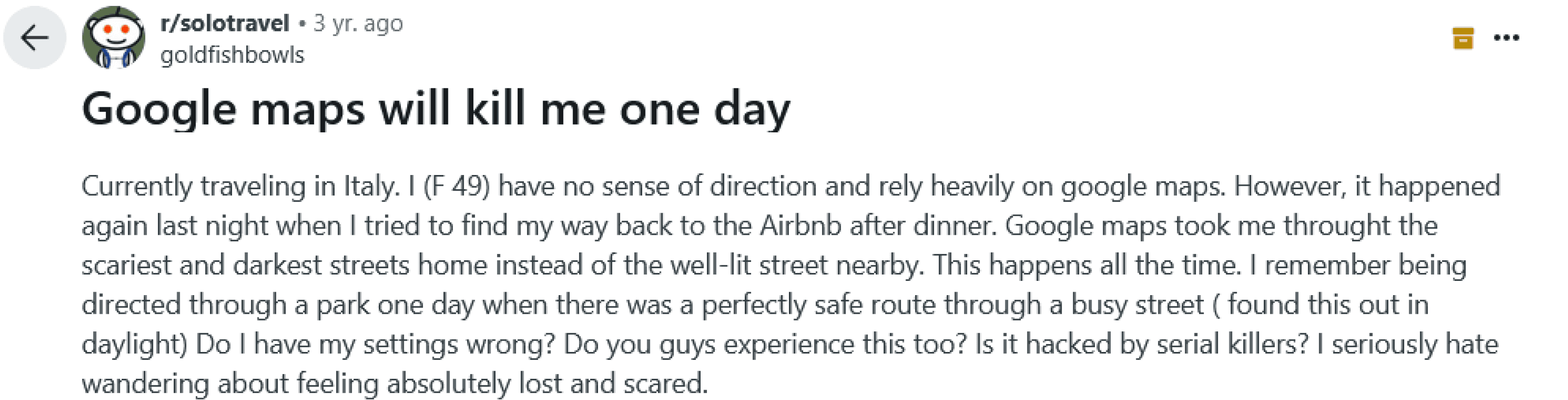
"I was walking through Barcelona at 11pm. Google Maps sent me down a dark alley. I've never felt more anxious."
That experience started this project.
Key Constraint
This is a concept project without access to Google's internal data, engineering resources, or real users at scale.
Tourists Were Getting Lost,
and Scared
Google Maps treats a local commuter and a solo traveler at midnight exactly the same.
Research Phase
We Talked to Travelers
Here's what they told us.

12
User Interviews
Solo travelers aged 22-45
1000+
Reviews Analyzed
App Store & Reddit
127
Survey Responses
From 6 countries
6
Competitive Analysis
Navigation & travel apps
🚧
Confusing or Unsafe Routing
Tourists reported being sent through sketchy alleys, closed paths, especially when walking.
📍
Inaccurate or Missing Place Info
Attractions or restaurants were marked in the wrong spot, closed, or missing key details like hours or pricing.
🌐
Language Barriers Still Exist
Tourists unfamiliar with the local language struggled to understand place names and signs due to poor localization.
🚉
Transit Info Lacks Clarity
Metro and bus directions were often unclear, missing transfer details, or didn’t reflect real-time changes.
🔄
Slow or Glitchy in Low Signal Areas
In cities with poor internet or crowded tourist zones, the app lagged or failed to load maps or directions.
Finding Prioritization
While all five pain points emerged, we prioritized safety for three reasons:
1 / Frequency: Mentioned in 68% of user interviews and 47% of negative reviews
2 / Emotional intensity: Users described feeling "vulnerable," "scared," "abandoned" - stronger language than other issues
3 / Competitive gap: No major navigation app adequately addresses safety for tourists specifically
“I wish it had warned me about the area I was walking into. A simple heads-up or safer route option would’ve made a huge difference.”
“Google Maps sometimes sends me through dark alleys, gives vague directions, leaving me lost and unsafe.”
— Sara, 29, solo traveler in Lisbon
— Paul, 34, solo traveler in Barcelona


📍
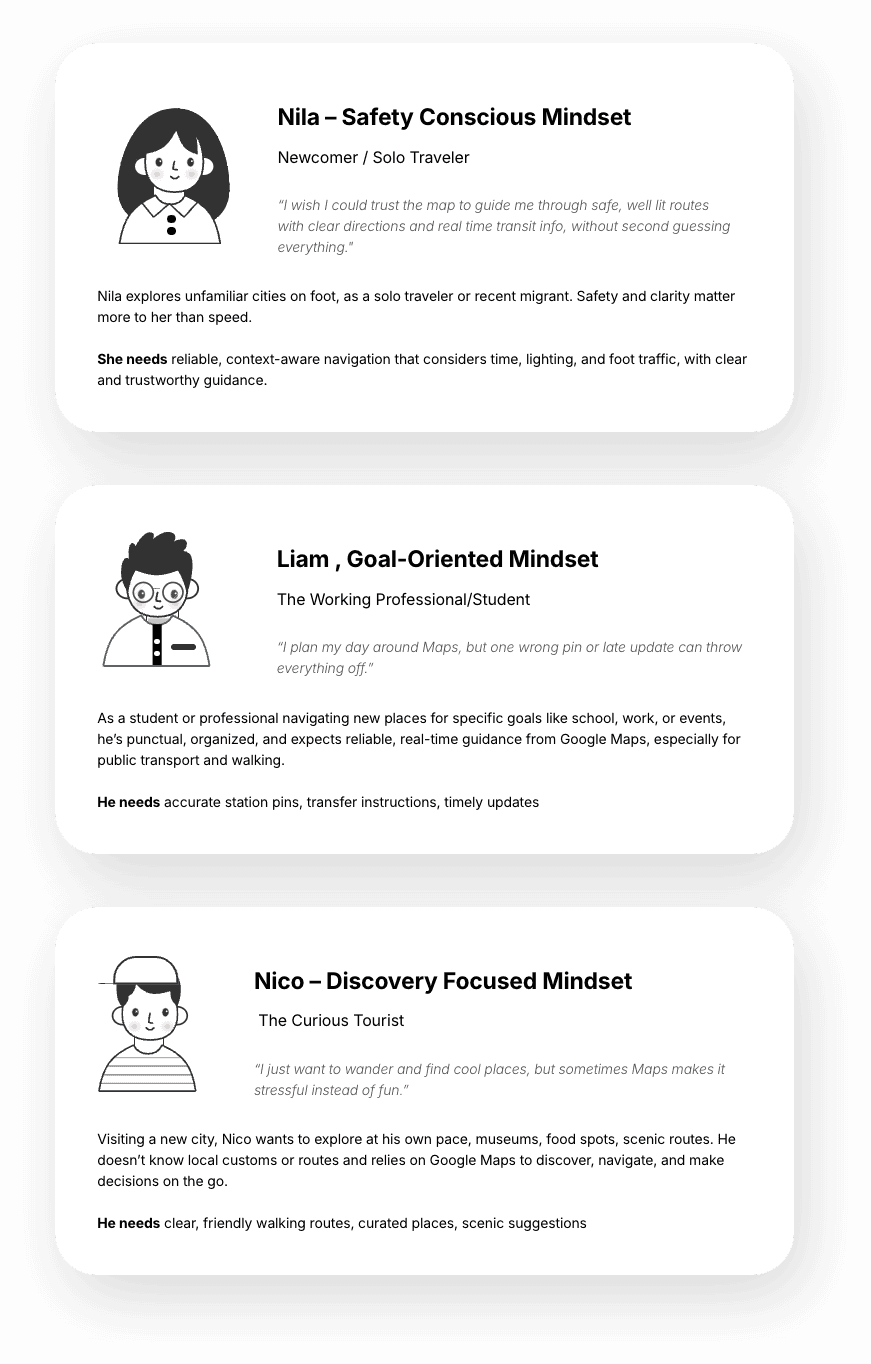
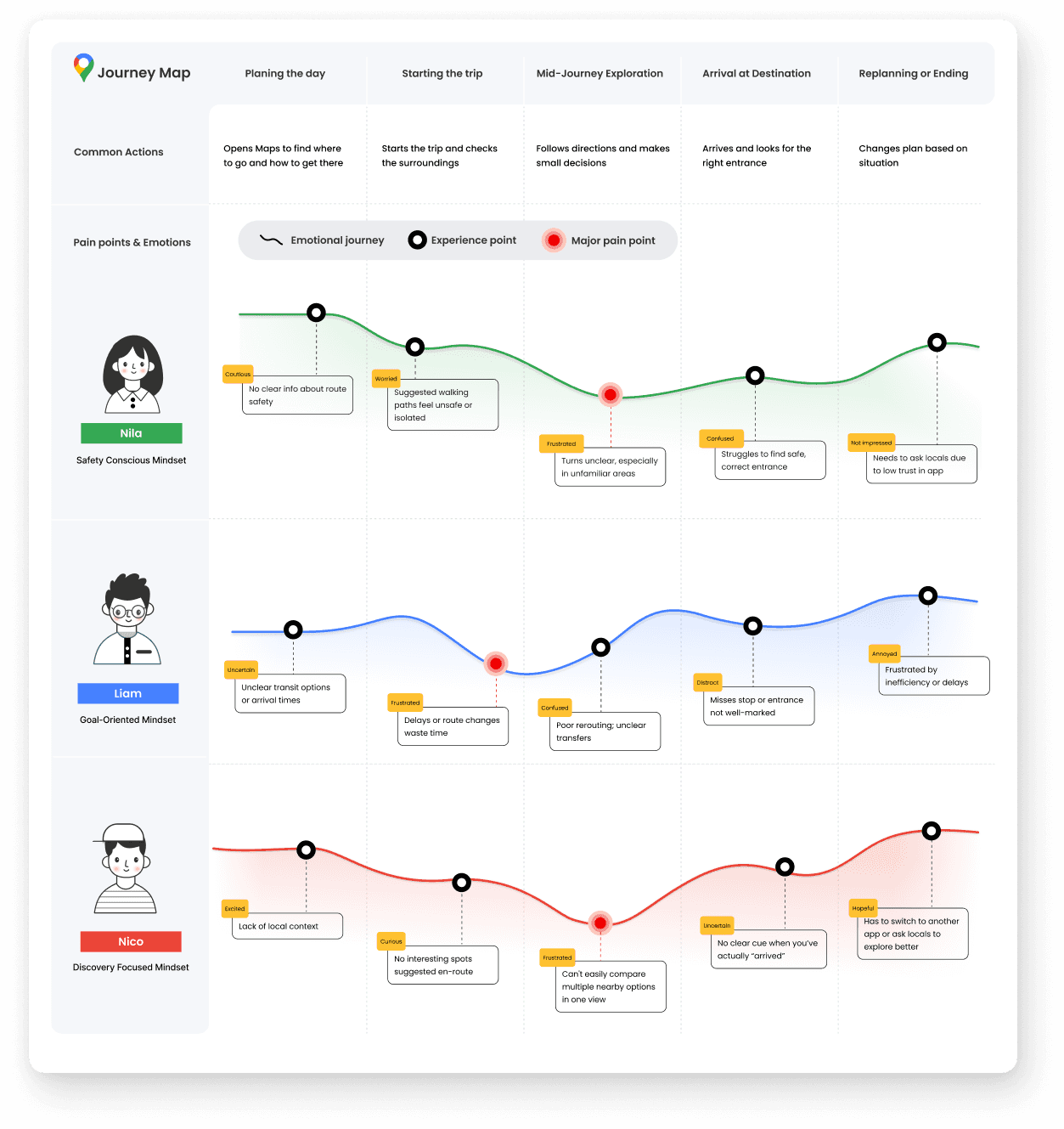
Meet the Travelers who Shaped our Solutions
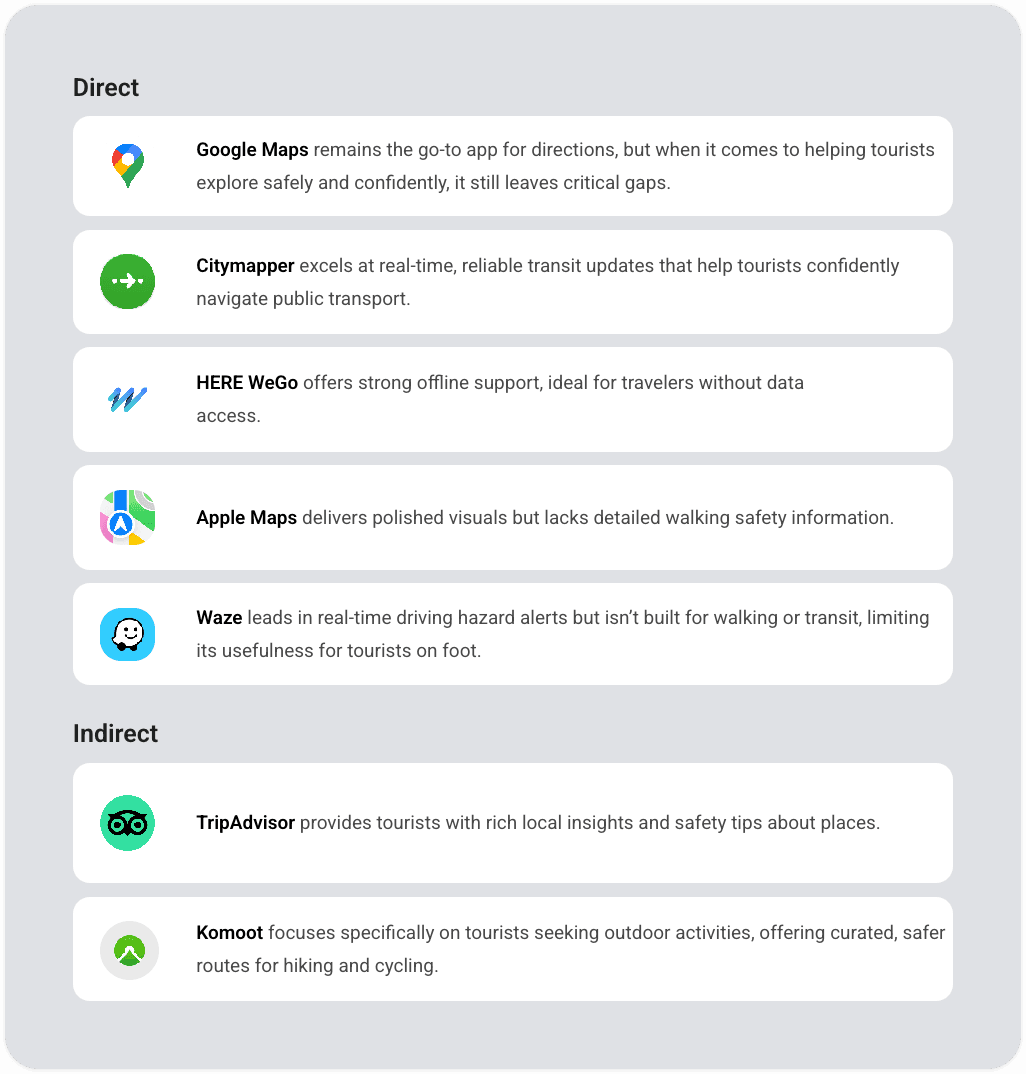
How Google Maps Supports, (and Fails), Tourists at Every Stage of Their Trip
Users pain points reveal how Google Maps falls short in addressing emotional needs like Safety, Control, and Inspiration, even though the core functionality remains the same.
Google Maps Leads in Reach, But Lags in Reassurance
Compared to competitors, Google Maps excels in coverage but lacks tourist-focused features such as, real-time safety updates, clarity in unfamiliar areas, and context-aware guidance, revealing key areas for improvement.
Google maps

City Mapper

HereWeGo

Apple maps

Waze

Trip Advisor

Komoot
Gap Analysis
No app combines navigation + safety holistically
Travel Mode as unified solution
Safety features buried in settings
One-tap activation
Crime data shown as raw numbers
Relative, contextual indicators
Emergency features require multiple taps
Persistent emergency access
What We Tried (and Failed)
The messy middle of 4 weeks.
Research
Week 1
Synthesis
Week 2
Ideation
Week 3
Prototype
Week 3
Test
Week 4
Refine
Week 4
Deciding What to Build
A clear view of which ideas can drive the most value for travelers, balancing Impact with Effort to guide smarter design decisions.
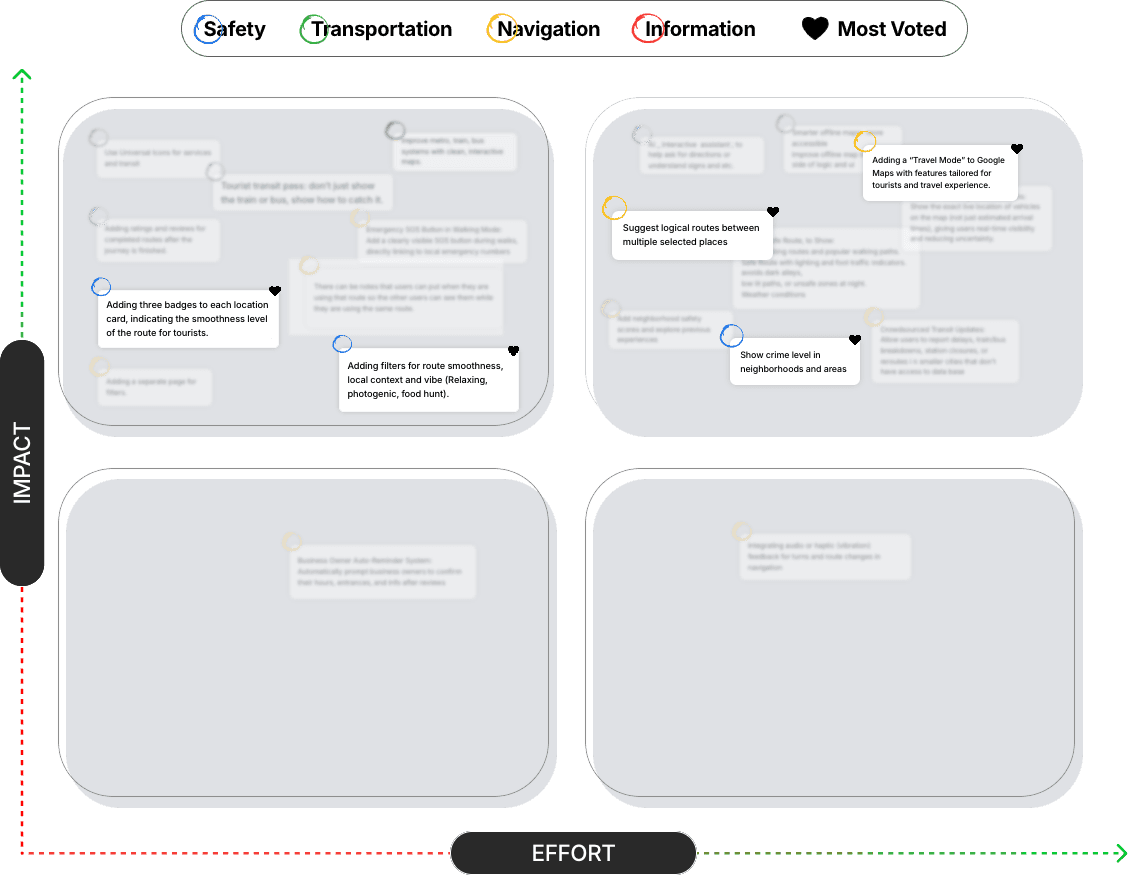
Feature Prioritization
We used an Impact/Effort matrix to prioritize features based on user value and implementation complexity.
High Impact, Low Effort
Quick Wins - Built First
Emergency Access Button
Safety Overlay & Route Comparison
High Impact, High Effort
Strategic Priorities
Travel Mode Toggle
Contextual Alerts System
Lower Priority
Future Iterations
Community Local Insights
Smart Route Ordering
Prioritization Rationale
We focused on features that addressed the core safety anxiety without requiring complex data infrastructure. The Travel
Mode toggle and emergency access could ship immediately, while the safety overlay needed more backend work but
delivered the highest user value.
Key Design Decisions
Always-on safety for all users
Would clutter local experience
Opt-in Travel Mode
Absolute crime numbers
Misleading without context
Relative indicators + reviews
Separate safety app
Fragmented experience
Integrated into Google Maps
AI-only recommendations
Users want transparency
AI + community data hybrid
What Data told Us to build first
Travel Mode Activation
OFF
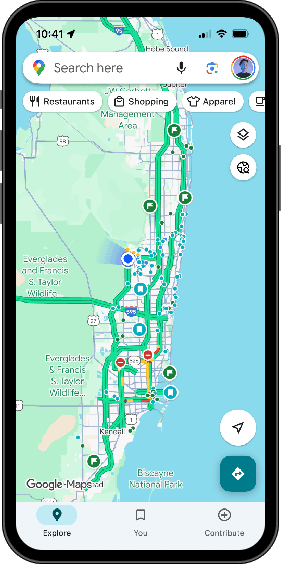
ON
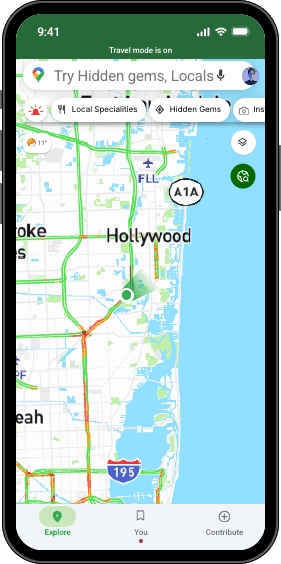
Problem
Google Maps treats Tourists like locals, offering no extra guidance, safety cues, or travel-specific support
Solution
Travel Mode Button
A button that activates a safer, personalized travel mode with
location-based tips and emergency access.
The interface turns green when active, and users can toggle it anytime without disrupting navigation.
Design Decision
Travel Mode button
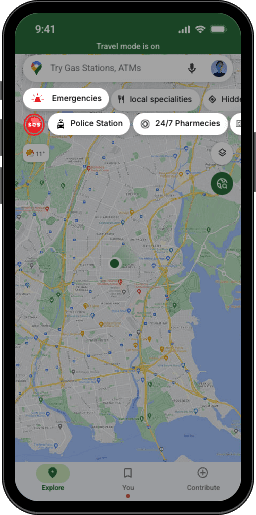
Problem
Tourists can feel vulnerable in unfamiliar areas when emergency help isn’t quickly accessible from the map, increasing stress in urgent situations.
Solution
Emergency Button
+ Quick Access Chips
Instantly connects users to nearby police stations,
hospitals, 24/7 pharmacies, or SOS help,
directly from the map.
Design Decision
Emergency Button + Quick Access Chips
Problem
Manually planning multi-stop routes is confusing and inefficient, especially in unfamiliar cities
Solution
Smart Route Suggestion
Helping Users Save Time on Multi-Stop Trips.
Automatically suggests the most logical route.
This option simplifies multi-stop planning and reduces the mental effort of choosing the best route.

Design Decision
Smart Route Ordering
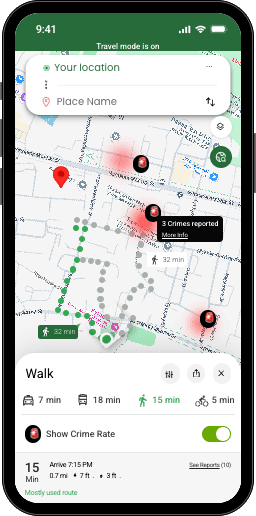
Problem
Travelers can't easily spot unsafe areas, making walking routes feel uncertain or risky.
Solution
🚨
Crime Rate Awareness Toggle
Allows travelers to instantly view and compare route safety using crime-level indicators.
Design Decision
Crime Rate Awareness Toggle
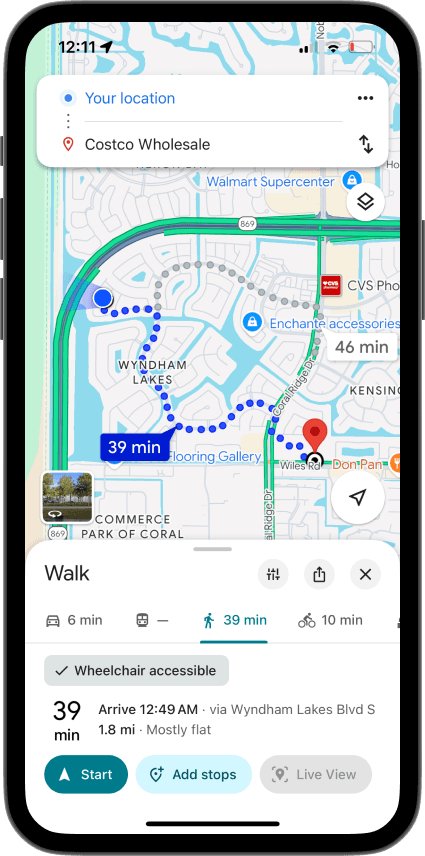
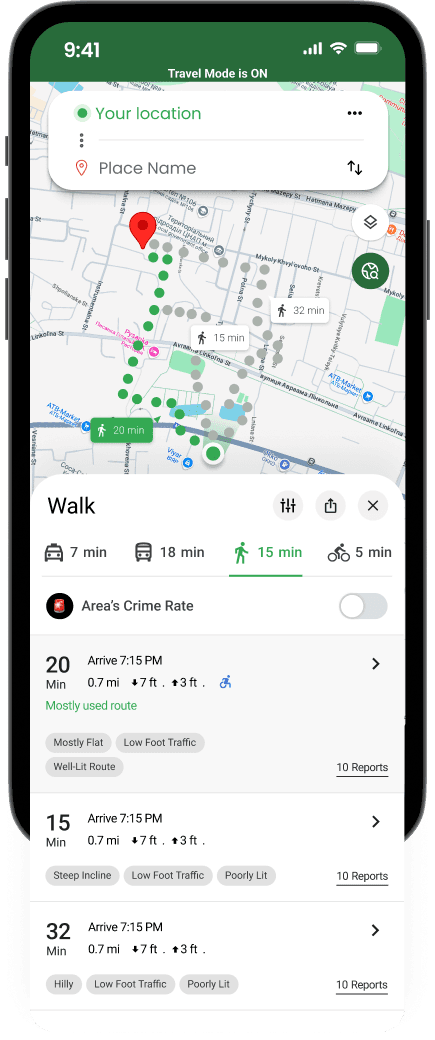
Problem
Google Maps shows only one walking route with no safety or accessibility info, leaving tourists unsure of better options.
Solution
Walking Route Comparison
Users can view multiple walking routes with insights on safety and accessibility.
A toggle lets them check crime rates, while the “See Reports” section offers real-world reviews from others to guide safer decisions.
Design Decision
Walking Route Comparison
Did It Actually Help?
We tested with 15 solo travelers to find out.
"Validation: What We Tested & What's Next"
✅ What I Validated (Usability Testing, n=15):
73% could locate Travel Mode within 5 seconds
11/15 users understood the crime overlay without explanation
Average confidence rating increased from 4.2 → 7.8 (10-point scale) when viewing safety features
🔮 What Would Require Production Testing:
Long-term retention: Do users continue using Travel Mode on subsequent trips?
Behavioral impact: Do users actually choose safer routes when presented with crime data?
False positive rate: How often does the safety overlay cause unnecessary anxiety?
Cross-cultural effectiveness: Does this work equally well in different countries/cultures?
📊 Proposed A/B Test Framework:
Control: Standard Google Maps experience
Variant A: Travel Mode with all features
Variant B: Travel Mode without crime overlay (to isolate impact)
Duration: 6 weeks across 5 major tourist cities
Sample size: 50,000 users per variant
Test Setup
Participants
15 solo travelers
Age range
22-45 years
Method
Remote moderated
Platform
Maze + Zoom
Duration
30 min each
Metric
Result
Interpretation
Discoverability
73%
Found Travel Mode within 5 seconds
Comprehension
11/15
Understood crime overlay without explanation
Emergency Speed
<3 sec
Located emergency button quickly
Task Completion
87%
Successfully found safer route
Key Insight
Users wanted safety info available but not always visible, validating our toggle approach. The emotional shift from anxiety to confidence wasn't captured in completion rates, but it's the entire point of the feature.
The Hard Questions We Asked Ourselves
Showing crime data could do more harm than good. We had to get this right.
The Challenge
Showing crime data risks perpetuating bias against
marginalized neighborhoods and could increase anxiety
rather than confidence.
Over-policed areas show higher crime
Data may not reflect actual safety
Could reinforce harmful stereotypes
Anxiety vs. empowerment balance
Our Approach
Opt-in toggle (not default behavior)
Relative indicators (Low/Medium/High)
Multiple data sources (not just police)
Positive indicators (Well-lit, Busy area)
Community reviews for context
No raw crime numbers
Open Questions for Future Research
Data accuracy across different cities/countries
Long-term psychological impact on users
Algorithmic bias in crime reporting data
Effect on local businesses in 'flagged' areas
What Success Would Look Like
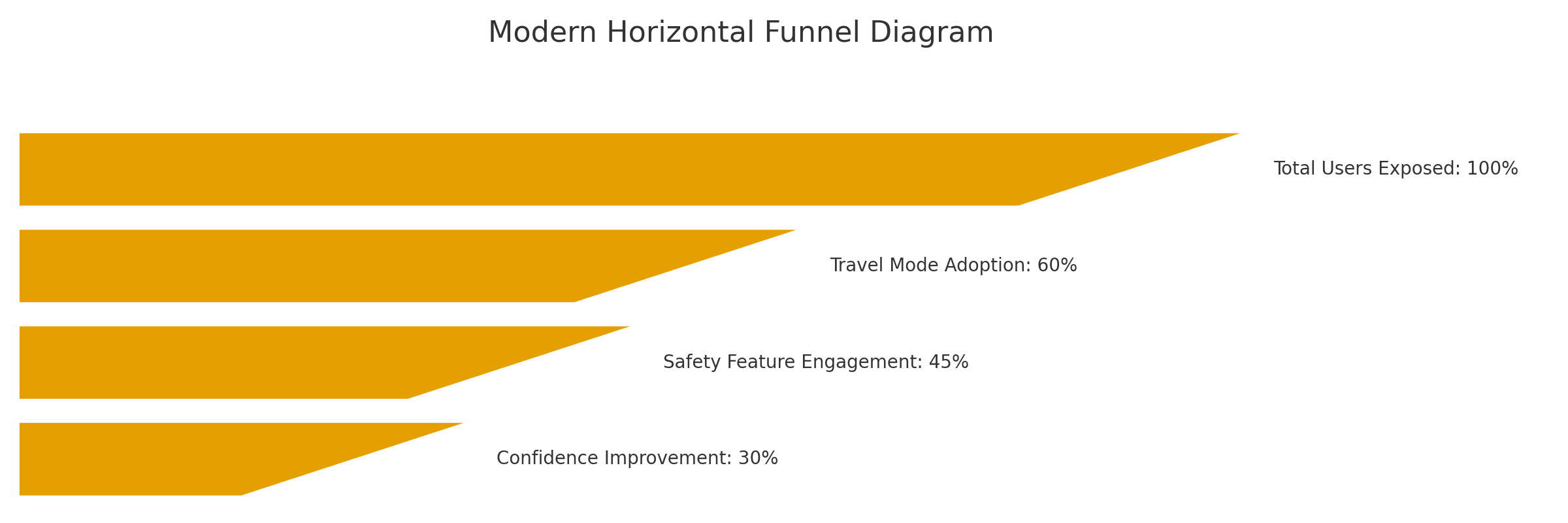
If Google shipped this tomorrow, here's how we'd measure it.
60%
Travel Mode Adoption
Similar features achieve 45%
(Spotify Driving Mode)
45%
Safety Feature Engagement
Our research: 68% report safety
concerns
+3 pts
Confidence Improvement
We saw +3.6 in testing (4.2 → 7.8)
What I'd Do Differently
Every project teaches you something. Here's what this one taught me.
Project Limitations
No access to Google's user data
Used public reviews and small-scale surveys
No engineering resources
Couldn't validate technical feasibility
Limited testing sample (n=15)
Directional insights, not statistically significant
3-week timeline
Constrained depth of research and iteration
What I'd Do Differently
Partner with local safety organizations
For more accurate, nuanced data
Conduct diary studies
To capture real-world navigation anxiety
Test with diverse populations
Different ages, abilities, travel styles
A/B test anxiety vs. empowerment framing
To optimize emotional impact
Design is never neutral
The crime data feature forced
uncomfortable conversations
about bias, anxiety, and
responsibility. Avoiding those
conversations leads to harmful
products.
Users surprise you
I thought crime overlay would be
the star. It was actually the most
controversial. Meanwhile, smart
route suggestions delighted
users.
Constraints breed clarity
No access to Google's data
forced us to focus on the core
emotional problem: tourists don't
feel confident navigating alone.
Risks & Next Steps
Even in a concept phase, I identified potential risks that would need addressing:
Data accuracy & bias: Crime data could be outdated or reflect policing bias rather than actual safety. Would need partnerships with trusted data sources + algorithmic fairness review.
Anxiety vs. empowerment: Could safety warnings increase anxiety rather than confidence? Would need psychological research input.
Feature bloat: Adding too many tourist-specific features could overwhelm the core experience. Would need careful progressive disclosure.
Privacy concerns: Travel Mode activation could signal "I'm a tourist/vulnerable." Would need privacy-by-design approach.
Reflection:
Initially, I focused only on feature usability. Through this project, I learned to think more holistically about success metrics, market benchmarks, and systematic validation approaches—even in concept work.
More projects


More projects
Quick Overview of the Solutions
Emergency Button
Instantly connects users to nearby police stations, hospitals, 24/7 pharmacies, or SOS help, directly from the map.
🚨
Crime Rate Awareness
Instantly connects users to nearby police stations, hospitals, 24/7 pharmacies, or SOS help, directly from the map.
Walking Route
Comparison
Users can view multiple walking routes with insights on safety and accessibility.
A toggle lets them check crime rates, while the “See Reports” section offers real-world reviews from others to guide safer decisions.
Smart Route Suggestion
Helping Users Save Time on Multi-Stop Trips.
Automatically suggests the most logical route.
This option simplifies multi-stop planning and reduces the mental effort of choosing the best route.
Summary
We designed a Travel Mode with Smart Route Suggestions, Safety insights, a Crime Rate heat map, and Emergency Access, aimed at improving clarity and traveler confidence.
Problem to solve
Tourists often struggle to assess route safety and clarity in unfamiliar areas, leading to confusion, stress, and missed opportunities for confident navigation and exploration.
Behind the Scenes
How did We get there
Desk Research
User Interview
Survey
Early signals lit the way,
guiding us toward deeper understanding
Safety stood out as the most critical concern, supported by frequent tourist feedback and data insights, leading us to prioritize it in our design decisions
🌐
Language Barriers Still Exist
Tourists unfamiliar with the local language struggled to understand place names and signs due to poor localization.
🚉
Transit Info Lacks Clarity
Metro and bus directions were often unclear, missing transfer details, or didn’t reflect real-time changes.
🔄
Slow or Glitchy in Low Signal Areas
In cities with poor internet or crowded tourist zones, the app lagged or failed to load maps or directions.
🚧
Confusing or Unsafe Routing
Tourists reported being sent through sketchy alleys, closed paths, especially when walking.
From the Streets to the Screens: What Users Really Experience
Through voices and moments shared, a pattern unfolded, revealing the quiet struggles and common threads that shape how people find their way and place their trust in the journey.
“I wish it had warned me about the area I was walking into. A simple heads-up or safer route option would’ve made a huge difference.”
“Google Maps sometimes sends me through dark alleys, gives vague directions, or shows buses that don’t arrive, leaving me lost and unsafe.”
📍
Meet the travelers
who shaped our solutions
Through voices and moments shared, a pattern unfolded, revealing the quiet struggles and common threads that shape how people find their way and place their trust in the journey.
How Google Maps Supports, and Fails, Tourists at Every Stage of Their Trip
Users pain points reveal how Google Maps falls short in addressing emotional needs like Safety, Control, and Inspiration, even though the core functionality remains the same.
Google Maps Leads in Reach, But Lags in Reassurance
Compared to competitors, Google Maps excels in coverage but lacks tourist-focused features such as, real-time safety updates, clarity in unfamiliar areas, and context-aware guidance, revealing key areas for improvement.
A clear view of which ideas can drive the most value for travelers, balancing Impact with Effort to guide smarter design decisions.
Deciding What to Build
Solution
Emergency Button +
Quick Access Chips
Instantly connects users to nearby police stations, hospitals, 24/7 pharmacies, or SOS help, directly from the map.
Probelm
Tourists can feel vulnerable in unfamiliar areas when emergency help isn’t quickly accessible from the map, increasing stress in urgent situations.
Solution
Emergency Button +
Quick Access Chips
Instantly connects users to nearby police stations, hospitals, 24/7 pharmacies, or SOS help, directly from the map.
Probelm
Tourists can feel vulnerable in unfamiliar areas when emergency help isn’t quickly accessible from the map, increasing stress in urgent situations.
Solution
Emergency Button +
Quick Access Chips
Instantly connects users to nearby police stations, hospitals, 24/7 pharmacies, or SOS help, directly from the map.
Probelm
Tourists can feel vulnerable in unfamiliar areas when emergency help isn’t quickly accessible from the map, increasing stress in urgent situations.
Solution
Emergency Button +
Quick Access Chips
Instantly connects users to nearby police stations, hospitals, 24/7 pharmacies, or SOS help, directly from the map.
Probelm
Tourists can feel vulnerable in unfamiliar areas when emergency help isn’t quickly accessible from the map, increasing stress in urgent situations.
Constraints
🔍
No Access to Real User Data
Since we lacked real user data, we used public reviews to find pain points, future research should include direct user input.
⏱
Limited Time & Resources
A small team and tight deadline limited the project scope, testing, and iteration. We focused on key features with the highest potential impact.
🚫
No Engineering Support
Since we didn’t have developers, we couldn’t assess technical feasibility. Engineering input is key for refining and scoping solutions
More projects
Google maps
Enhancing safety and trust for travelers exploring new destinations with Google Maps.
Team
3 Product Designers
Date
May 15, 2025
Tools
Figma, Illustrator, Maze
In collaboration with two product designers, I worked on improving the travel experience for tourists by addressing personalization and safety.
Our solutions included custom travel modes and safer walking navigation, aimed at increasing retention and user confidence.
Google maps
Enhancing safety and trust for travelers exploring new destinations with Google Maps.
Team
3 Product Designers
Date
May 15, 2025
Tools
Figma, Illustrator, Maze
In collaboration with two product designers, I worked on improving the travel experience for tourists by addressing personalization and safety.
Our solutions included custom travel modes and safer walking navigation, aimed at increasing retention and user confidence.
Project Overview
Type
Unsolicited concept project (4-weeks sprint)
Team
3 product designers collaborating remotely
My Role
Product designer - Research, interaction design, prototyping
Timeline
May 2025
Tools
Figma
Maze
Google Forms
Figjam
"I was walking through Barcelona at 11pm. Google Maps sent me down a dark alley. I've never felt more anxious."
That experience started this project.
Key Constraint
This is a concept project without access to Google's internal data, engineering resources, or real users at scale.
Tourists Were Getting Lost,
and Scared
Google Maps treats a local commuter and a solo traveler at midnight exactly the same.
Constraints
🔍
No Access to Real User Data
Since we lacked real user data, we used public reviews to find pain points, future research should include direct user input.
⏱
Limited Time & Resources
A small team and tight deadline limited the project scope, testing, and iteration. We focused on key features with the highest potential impact.
🚫
No Engineering Support
Since we didn’t have developers, we couldn’t assess technical feasibility. Engineering input is key for refining and scoping solutions
🚧
Confusing or Unsafe Routing
Tourists reported being sent through sketchy alleys, closed paths, especially when walking.
📍
Inaccurate or Missing Place Info
Attractions or restaurants were marked in the wrong spot, closed, or missing key details like hours or pricing.
🌐
Language Barriers Still Exist
Tourists unfamiliar with the local language struggled to understand place names and signs due to poor localization.
🚉
Transit Info Lacks Clarity
Metro and bus directions were often unclear, missing transfer details, or didn’t reflect real-time changes.
🔄
Slow or Glitchy in Low Signal Areas
In cities with poor internet or crowded tourist zones, the app lagged or failed to load maps or directions.
Finding Prioritization
While all five pain points emerged, we prioritized safety for three reasons:
Frequency: Mentioned in 68% of user interviews and 47% of negative reviews
Emotional intensity: Users described feeling "vulnerable," "scared," "abandoned" - stronger language than other issues
Competitive gap: No major navigation app adequately addresses safety for tourists specifically
“I wish it had warned me about the area I was walking into. A simple heads-up or safer route option would’ve made a huge difference.”
“Google Maps sometimes sends me through dark alleys, gives vague directions, or shows buses that don’t arrive, leaving me lost and unsafe.”
“I wish it had warned me about the area I was walking into. A simple heads-up or safer route option would’ve made a huge difference.”
“Google Maps sometimes sends me through dark alleys, gives vague directions, or shows buses that don’t arrive, leaving me lost and unsafe.”
📍
Nila – Safety Conscious Mindset
Newcomer / Solo Traveler
“I wish I could trust the map to guide me through safe, well lit routes with clear directions and real time transit info, without second guessing everything."
Nila explores unfamiliar cities on foot, as a solo traveler or recent migrant. Safety and clarity matter more to her than speed.
She needs reliable, context-aware navigation that considers time, lighting, and foot traffic, with clear and trustworthy guidance.
Liam , Goal-Oriented Mindset
The Working Professional/Student
“I plan my day around Maps, but one wrong pin or late update can throw everything off.”
As a student or professional navigating new places for specific goals like school, work, or events, he’s punctual, organized, and expects reliable, real-time guidance from Google Maps, especially for public transport and walking.
He needs accurate station pins, transfer instructions, timely updates
Nico – Discovery Focused Mindset
The Curious Tourist
“I just want to wander and find cool places, but sometimes Maps makes it stressful instead of fun.”
Visiting a new city, Nico wants to explore at his own pace, museums, food spots, scenic routes. He doesn’t know local customs or routes and relies on Google Maps to discover, navigate, and make decisions on the go.
He needs clear, friendly walking routes, curated places, scenic suggestions
Meet the travelers who shaped our solutions
🧩
Design Consideration: Supporting Less Tech-Savvy and Older Users
We considered the needs of older and less tech-savvy users, whose challenges align with Nila and Nico, especially around clarity, confidence, and ease of use.
Our solutions focus on simple, safe, and stress-free navigation in unfamiliar places.
How Google Maps Supports, and Fails, Tourists at Every Stage of Their Trip
Users pain points reveal how Google Maps falls short in addressing emotional needs like Safety, Control, and Inspiration, even though the core functionality remains the same.
Google Maps Leads in Reach, But Lags in Reassurance
Compared to competitors, Google Maps excels in coverage but lacks tourist-focused features such as, real-time safety updates, clarity in unfamiliar areas, and context-aware guidance, revealing key areas for improvement.
Deciding What to Build
A clear view of which ideas can drive the most value for travelers, balancing Impact with Effort to guide smarter design decisions.
Everything Starts with
Travel Mode
OFF
ON
Solution
Travel Mode Button
A button that activates a safer, personalized travel mode with
location-based tips and emergency access.
The interface turns green when active, and users can toggle it anytime without disrupting navigation.
Probelm
Google Maps treats Tourists like locals, offering no extra guidance, safety cues, or travel-specific support
Solution
Emergency Button + Quick Access Chips
Instantly connects users to nearby police stations, hospitals, 24/7 pharmacies, or SOS help, directly from the map.
Probelm
Tourists can feel vulnerable in unfamiliar areas when emergency help isn’t quickly accessible from the map, increasing stress in urgent situations.
Quick Overveiw of our Solutions
Emergency Button
Instantly connects users to nearby police stations, hospitals, 24/7 pharmacies, or SOS help, directly from the map.
🚨
Crime Rate Awareness Toggle
Instantly connects users to nearby police stations, hospitals, 24/7 pharmacies, or SOS help, directly from the map.
Walking Route Comparison
Users can view multiple walking routes with insights on safety and accessibility.
A toggle lets them check crime rates, while the “See Reports” section offers real-world reviews from others to guide safer decisions.
Smart Route Suggestion
Helping Users Save Time on Multi-Stop Trips.
Automatically suggests the most logical route.
This option simplifies multi-stop planning and reduces the mental effort of choosing the best route.
Probelm
Manually planning multi-stop routes is confusing and inefficient, especially in unfamiliar cities
Solution
Smart Route Suggestion
Helping Users Save Time on Multi-Stop Trips.
Automatically suggests the most logical route.
This option simplifies multi-stop planning and reduces the mental effort of choosing the best route.
What the Data Told Us to Build First
Backed by user insights and prioritization scores,
these solutions offer the highest impact with feasible effort.
Research Phase
We Talked to Travelers
Here's what they told us.
12
User Interviews
Solo travelers aged 22-45
500+
Reviews Analyzed
App Store & Reddit
127
Survey Responses
From 6 countries
8
Competitive Analysis
Navigation & travel apps